AI engineers can use six different categories of tools without needing six different platforms. The tools that matter most are often the ones you open repeatedly to build, test, deploy, and debug an application.
In 2026, the challenge is not finding AI tools. It is choosing a small stack that works together, fits your budget, and helps you build something employers can evaluate.
1. Model Providers: Where the Intelligence Comes From
Model providers give your application access to language models that generate text, summarize documents, classify data, or reason through tasks. You usually call them through an API rather than running the model yourself.
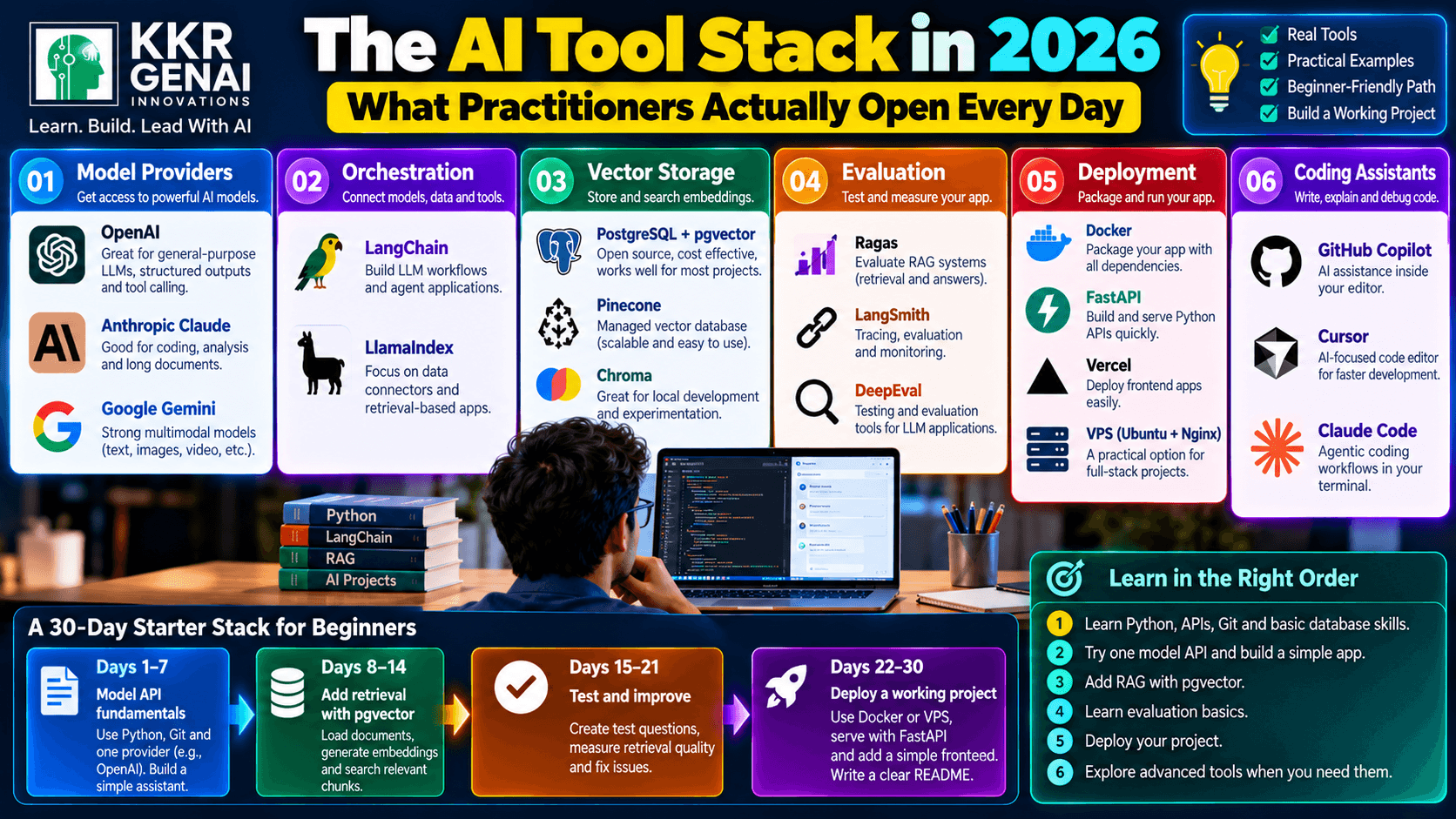
OpenAI offers models for general-purpose generation, structured outputs, tool calling, and multimodal applications. Anthropic Claude is widely used for coding, analysis, and working with long documents. Google Gemini provides models and APIs for text, images, and other multimodal tasks.
You do not need to master all three providers immediately. Learn how to make an API request, manage credentials securely, track token usage, handle errors, and compare output quality and cost.
2. Orchestration and Vector Storage: Connecting the Pieces
Orchestration tools help connect models, prompts, external tools, and retrieval steps into a working application. LangChain provides components for building LLM workflows, while LlamaIndex focuses on connecting models to data and building retrieval-based applications.
For a simple application, you may not need either framework at first. Direct API calls and ordinary Python functions are often easier to understand; add a framework when your workflow becomes complicated enough to justify it.
Vector storage supports semantic search by storing numerical representations of text. PostgreSQL with pgvector is a practical option if you already use PostgreSQL, Pinecone provides a managed vector database, and Chroma is useful for experimenting with retrieval in local or application environments.
For example, a support assistant can split product manuals into chunks, generate embeddings, store them in pgvector, and retrieve relevant passages before asking an LLM to answer a question. This pattern is called Retrieval-Augmented Generation, or RAG.
3. Evaluation, Deployment, and Coding Assistants
A convincing answer is not necessarily a correct answer. Evaluation tools help you test whether a system retrieves the right information, follows instructions, and produces reliable outputs across a collection of test cases.
Ragas supports evaluation of RAG systems, including retrieval and answer-quality measurements. LangSmith provides tracing and evaluation features for LLM applications, while DeepEval offers testing and evaluation tools that can fit into development workflows.
Start with a small set of representative questions and expected answers. Track retrieval quality, unsupported claims, latency, and cost instead of judging the application from a handful of impressive demonstrations.
For deployment, Docker packages applications and their dependencies into containers, FastAPI provides a Python framework for serving API endpoints, and Vercel is commonly used to deploy frontend applications. A traditional VPS running Ubuntu, Nginx, and a Node.js or Python backend is also a practical option.
Coding assistants can speed up implementation, but their suggestions still need review. GitHub Copilot integrates AI assistance into coding workflows, Cursor provides an AI-focused code editor, and Claude Code supports agentic coding workflows through a terminal-based interface.
Use these assistants to explain unfamiliar code, generate test cases, and identify possible bugs. Run the code, review security implications, and test changes before deploying them.
4. What Should Beginners Learn First?
Do not try to learn every layer at once. Begin with Python or JavaScript, HTTP APIs, JSON, environment variables, Git, and basic database operations; these skills remain useful regardless of which model provider or framework you choose.
Next, learn one model API and build a small application that accepts a question and returns an answer. Then add RAG using PostgreSQL with pgvector, create a test set, and measure whether retrieval improves the results.
Advanced agent frameworks, complex multi-agent architectures, specialized vector databases, and elaborate observability platforms can wait until your project needs them. You will learn more from debugging one working application than from collecting tutorials about ten competing frameworks.
5. A Minimal AI Tool Stack You Can Learn in 30 Days
Days 1–7: Model API fundamentals. Use Python, Git, and one provider such as OpenAI. Build a command-line assistant, store API credentials in environment variables, handle API errors, and record token usage.
Days 8–14: Add retrieval. Set up PostgreSQL with pgvector, load a small collection of documents, generate embeddings, and retrieve the top five relevant chunks for a question. Inspect the returned text rather than relying only on similarity scores.
Days 15–21: Test and improve. Create 30–50 representative questions and compare the answers with and without retrieval. Log failures, reduce unnecessary context, and check whether the system uses the correct source documents.
Days 22–30: Deploy a working project. Package the backend with Docker or deploy it to a suitable VPS, expose an API using FastAPI, and add a simple frontend if needed. Write a README explaining the architecture, setup instructions, limitations, and evaluation results.
By day 30, your goal is not to master every tool. It is to have one demonstrable application that you can explain, test, and improve—and a clear understanding of why each component belongs in the stack.
What is actually in your daily stack right now?
Join the KKRGENAI community discussion to share your favorite tools, compare stacks, and learn what other AI practitioners use in real projects.